 BuildSheet
Quick answer: The most reliable way to track car modification costs is to log every purchase the moment it happens: parts, labor, tools, shipping, taxes, and consumables, organized by category in a dedicated app or spreadsheet. Build budgets often drift because owners track the big-ticket parts and forget the small stuff that quietly drains money: hardware, fluids, shop supplies, and the tools they buy just to install a single part.
If you're serious about your build, you need a system. This guide walks through exactly what to track, how to categorize it, and the three ways most enthusiasts actually do it.
Why most car builds blow the budget
Talk to anyone who's modified a car and they'll tell you the same thing: "I have no idea what I've actually spent."
The reason is simple. When you buy a $1,200 set of coilovers, you remember it. When you buy $14 in zip ties at AutoZone, you don't. But over a two-year build, those $14 trips add up to thousands of dollars, and they're almost never tracked.
The other budget-killer is scope creep. You buy coilovers, then you realize you need camber arms. The camber arms reveal that your bushings are toast, so you replace those too. Now you need an alignment. Three months later you've spent $3,800 on what started as a "$1,200 coilover install."
A proper tracking system catches both problems. It forces you to log every small purchase, and it shows you in real time when one mod is triggering a chain of follow-on costs.
What actually counts as a build cost
Most enthusiasts undercount because they only track parts. A complete cost picture includes:
Parts - the obvious stuff. Coilovers, intake, exhaust, wheels, tires, brakes.
Labor - whether it's shop installation, dyno tuning, alignment, or paying a friend to help. If you're doing the work yourself, track your own hours at a notional rate so you understand the true cost of the project.
Tools - the floor jack, jack stands, impact gun, torque wrench, ramps, and specialty tools you bought specifically for the build. These are real costs even if they last beyond this project.
Consumables and hardware - bolts, washers, gaskets, fluids, RTV, brake cleaner, zip ties, electrical tape, and shop towels. This category can easily become hundreds or thousands of dollars on a serious build.
Shipping and taxes - a $400 part with $80 shipping and $32 tax is a $512 part. Track the real number.
Diagnostics and recovery - scan tools, OBD adapters, tow bills when something goes wrong, rental car while the build car is down.
Documentation and registration - dyno sheets, alignment printouts, emissions retests, title work after engine swaps.
If you skip any of these categories, your build sheet is fiction.
How to organize what you track
Good tracking isn't just logging numbers. It's organizing them in a way that answers the questions you'll actually ask later. Four dimensions matter most:
By system. Suspension, drivetrain, brakes, intake, exhaust, electrical, interior, exterior. This is how you'll think about the car and how you'll explain it to a buyer later.
By mod project. "Coilover install" is one project that might include parts, alignment, tools, and labor across multiple receipts. Grouping these together shows the true cost of each modification, not just the line items.
By date. This lets you see spend per month and catch seasonal patterns.
By vendor. This lets you spot which suppliers you're actually loyal to and where you may be overpaying.
Any system worth using lets you slice the data all four ways without re-entering anything. BuildSheet's expense tracker and App Store app are built around that exact workflow.
The three ways enthusiasts actually track builds
1. The notes-app method
How most people start. Type purchases into your phone's notes app, maybe with running totals. Free, instant, requires no setup.
Why it fails: No categories, no photo storage, no receipts attached, no way to see totals by system, no backup if your phone dies. Within a few months it becomes an unreadable wall of text. Useless when it's time to sell the car.
2. The spreadsheet method
Excel or Google Sheets with columns for date, item, category, vendor, cost, and notes. Some enthusiasts build elaborate templates with pivot tables, charts, and per-mod groupings.
Why it works: Total control, totally free, and you can build any view you want.
Why it falls apart: Manual entry kills consistency. You need to be at a computer, or on mobile fighting the UI, every time you make a purchase. Receipt photos are awkward to attach. You can't easily share it on social or send it to a buyer. Many spreadsheets get abandoned after the first few months of a build.
3. The dedicated app method
Purpose-built apps like BuildSheet, Track My Mods, and Drivvo handle the entry friction, photo receipts, categorization, and reporting in one place.
Why it works: Logging a mod takes 20 seconds. Photos attach to the entry. Categories are pre-built. Reports generate automatically. You can show your build to anyone with a single tap.
Why it sometimes fails: Picking the wrong app for what you're actually doing. A fleet maintenance app like Drivvo is great if your goal is tracking oil changes and fuel economy across a daily driver, but it wasn't designed for documenting a modified build. Apps built specifically for enthusiasts handle the mod-by-mod workflow that fleet apps can't.
For most serious builds, an app beats a spreadsheet for one simple reason: the system you'll actually use beats the system that's theoretically perfect.
A step-by-step system for tracking your build
If you're starting fresh:
- Pick one tool and commit. Don't half-track in three places. Pick an app or a spreadsheet and use only that.
- Create categories before you log anything. Suspension, drivetrain, brakes, intake/exhaust, wheels/tires, interior, exterior, electrical, tools, consumables, labor, registration.
- Log purchases the same day. Not at the end of the month. The moment the part ships or the credit card hits, log it. Take a photo of the receipt.
- Group by mod project. Every time you start a new mod, create a project bucket and tag everything that goes into it: parts, hardware, install labor, alignment if needed, tools you bought specifically for it.
- Review monthly. Look at the total, look at the per-category breakdown, and compare your actual spend against the budget. Adjust the next month's plan accordingly.
- Back up everything. If you're using a spreadsheet, save copies. If you're using an app, make sure it syncs to the cloud.
If you've already been building and want to backfill, pull your credit card statements for the last 6-12 months, filter for automotive purchases, and enter them in chronological order. Painful for one weekend, worth it forever.
A real example: a G82 M4 BuildSheet
To make this concrete, here's what a BMW G82 M4 build looks like when properly tracked in BuildSheet. Instead of relying on memory or a loose spreadsheet, the owner can see the build overview and the exact expense log side by side.
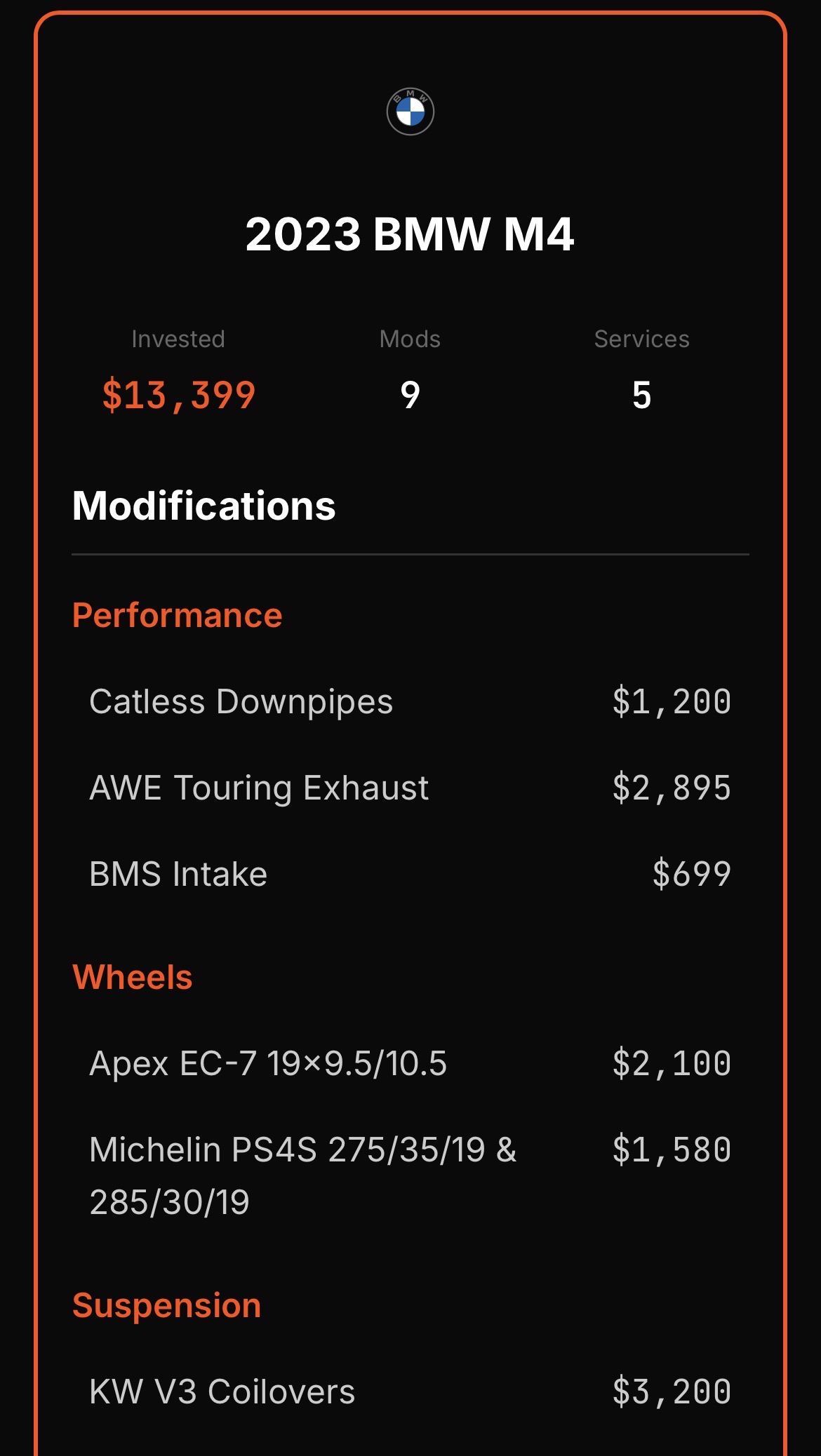
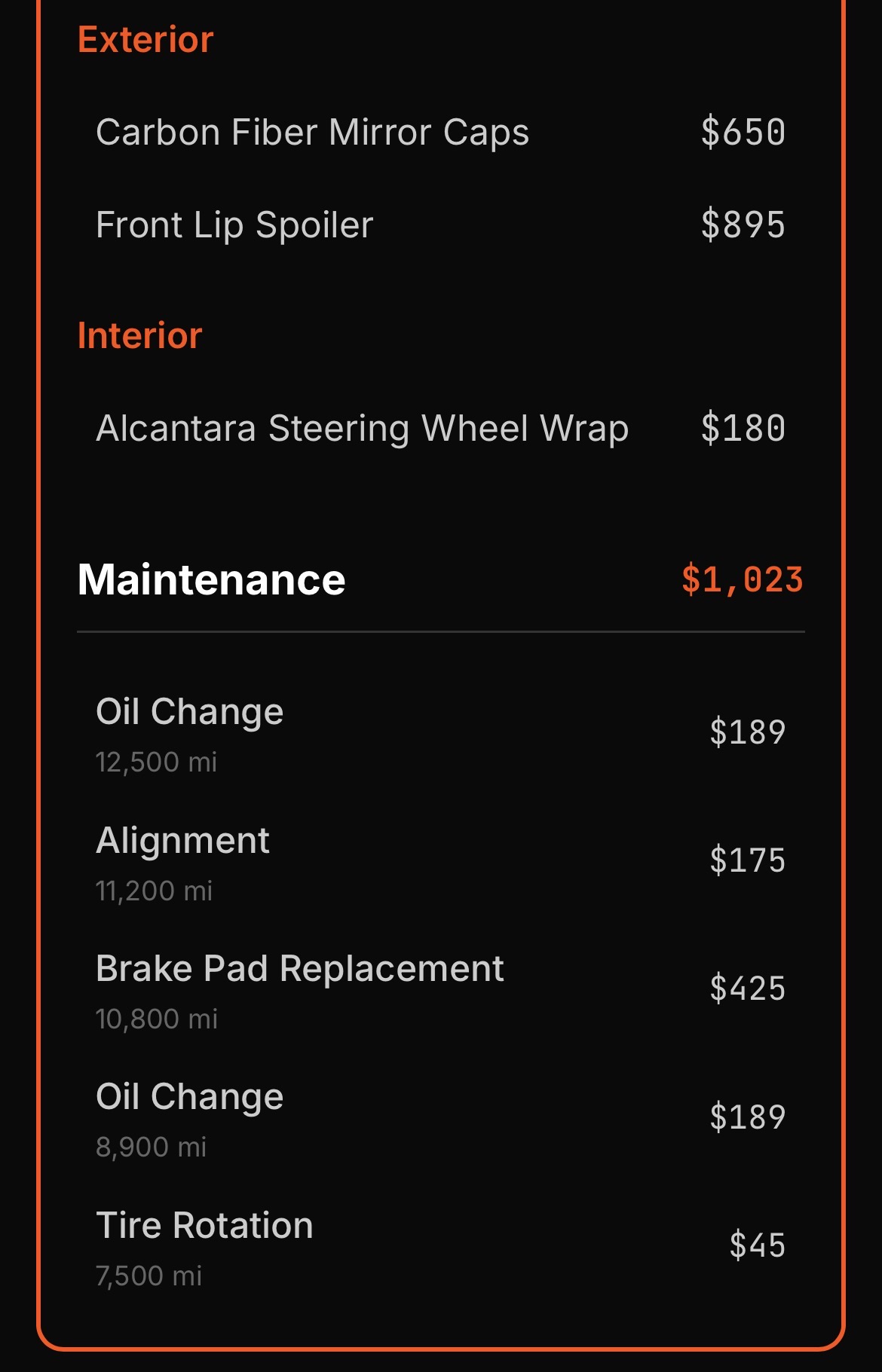
What the owner remembered spending: "About $8,500. Coilovers, exhaust, tires, fluids and some other mods."
What the actual build log showed: detailed categories, receipts, photos, vendors, and the total investment attached to the build history.
The gap between memory and reality is typical. The categories people forget - hardware, consumables, tools, shipping, and tax - are exactly the ones that quietly add up. BuildSheet keeps those numbers tied to the vehicle so you can use them later for resale, insurance, or just planning the next round of mods.
Common mistakes that wreck your tracking
- Tracking only big purchases. Anything under $50 still counts. The small stuff is usually 20-30% of a build total.
- Lumping shop labor into one line. Break it out by what was done. Otherwise you can't answer "how much did the suspension cost?" later.
- Not tracking DIY time. Even a notional $30/hour rate gives you a real sense of project cost.
- Skipping photos. You'll forget what a part looked like, what brand it was, or what it cost. Photos solve all three.
- Waiting until the end of the build to "organize it." You won't. Log as you go or it doesn't happen.
- Using the wrong tool. A fleet app for a build, a notes app for serious tracking, or a spreadsheet you only open from your laptop can all fail in predictable ways.
Why this matters when it's time to sell
A documented build is easier to explain and defend when it is time to sell because buyers can review receipts, photos of the install, brand-name parts, and a clear history. A binder of receipts and a clean build sheet turns "trust me" into "here it is."
Sellers without documentation are easier to lowball. Sellers with a complete build sheet can justify the number.
This is the second reason to track: beyond just understanding what you've spent, the data itself becomes a financial asset. To start tracking, open the BuildSheet web app or review the product features.